UDISE Plus (UDISE+)
UDISE Plus stands for: Unified District Information System for Education Plus
UDISE+ is the largest Management Information System (MIS) for school education in India. It is developed and managed by the:
- Ministry of Education, Government of India
- Department of School Education & Literacy
UDISE+ was designed to collect real-time, accurate, and comprehensive data from schools across India. Since the 2018–19 academic session, UDISE+ has been operating as a fully online system, making education data collection faster, more transparent, and more reliable.
Purpose of UDISE Plus
The main goal of UDISE+ is to:
- Improve planning and decision-making in school education
- Provide real-time data for policymakers
- Track school performance and infrastructure
- Ensure data-driven education reforms
It helps the government and education authorities understand what is happening at the ground level in schools.
Which Schools Are Covered Under UDISE+?
UDISE+ covers all types of schools in India, including:
- Government Schools
- Private Schools
- Aided Schools
- Schools under Central Government Bodies
- Schools under State Government Bodies
It covers education from: > Pre-Primary to Class 12 (Higher Secondary)
This makes UDISE+ the most comprehensive school education database in India.
What Type of Data Does UDISE+ Collect?
UDISE+ collects detailed information through an online Data Collection Form (DCF). The system captures multiple categories of data:
- Type of school (Primary, Upper Primary, Secondary, Higher Secondary)
- School location and management type
- Recognition and affiliation details
UDISE+ collects information about school infrastructure such as:
- Number of classrooms
- Availability of toilets
- Drinking water facilities
- Electricity and internet connectivity
- Playground and library facilities
This helps assess the physical condition of schools across India.
Teacher-related data includes:
- Total number of teachers
- Gender-wise teacher data
- Teacher qualifications
- Subject-wise teacher availability
- Training and professional development
This helps track teacher availability and quality.
UDISE+ collects detailed enrollment data, including:
- Total student enrollment
- Class-wise enrollment
- Gender-wise enrollment (Male/Female)
- Category-wise data
This helps monitor dropout rates, gender parity, and participation across regions.
The system also tracks:
- Examination results
- Student performance indicators
- Academic progress trends
This supports better academic planning and evaluation.
How to Login on UDISE Plus
Go Official UDISE+ Login Website
To login on UDISE+, you can Click the official UDISE+ link (from your school or district) Or search on Google : udiseplus.gov.in
Once you open the website, you will see the official UDISE+ dashboard interface. Now Follow These Steps
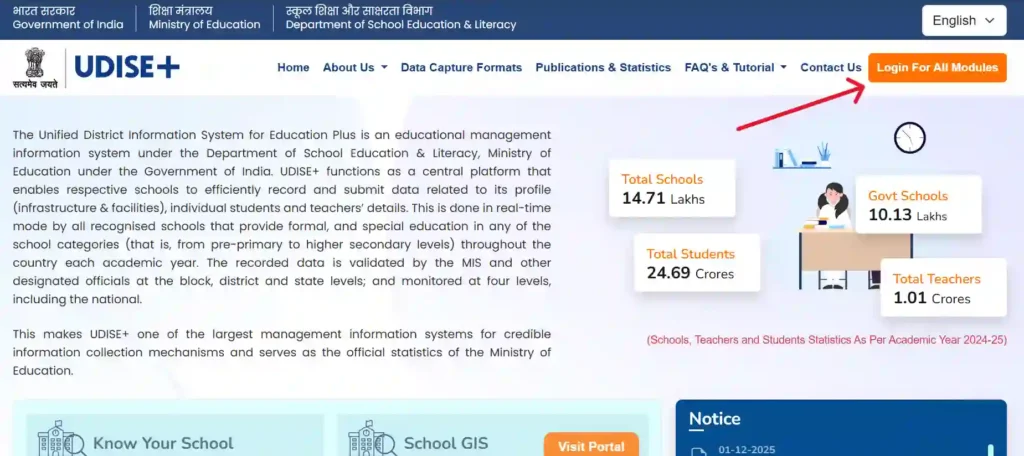
Step 1 : Click on “Login for All Modules”
On the homepage, you will find an option called:
- > Login for All Modules
Click on this option to proceed.
Step 2: Select Your State
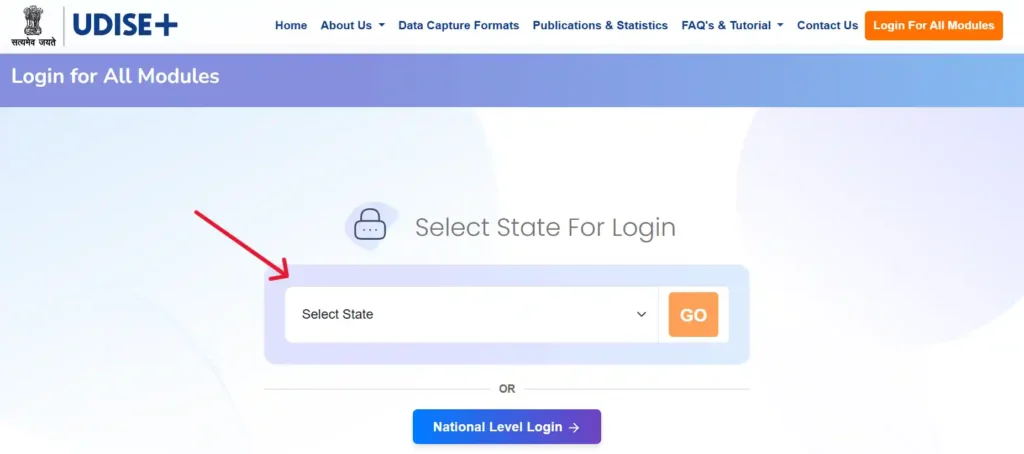
You will now see a state selection page.
- Select your state (for example: Uttar Pradesh)
- Click on the Go button
This will redirect you to your state-specific UDISE+ login portal.
Step 3: Choose the Correct Module
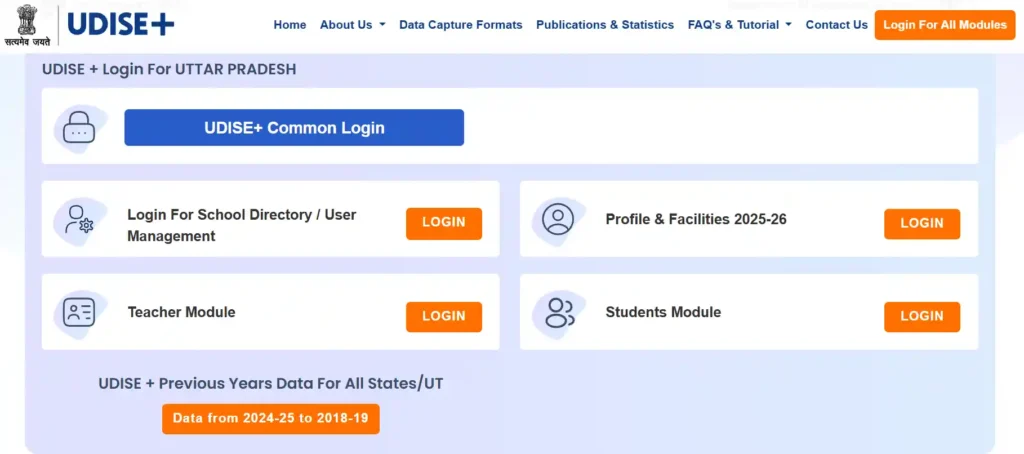
After selecting your state, you will see multiple modules such as:
- School Directory
- Student Module
- Teacher Module
- Profile & Facilities
- Report Module
Choose the module based on your work. For example:
- For student data entry → Student Module
- For school details → School Directory / Profile & Facilities
- For reports → Report Module
Step 4: Enter User ID, Password & Captcha
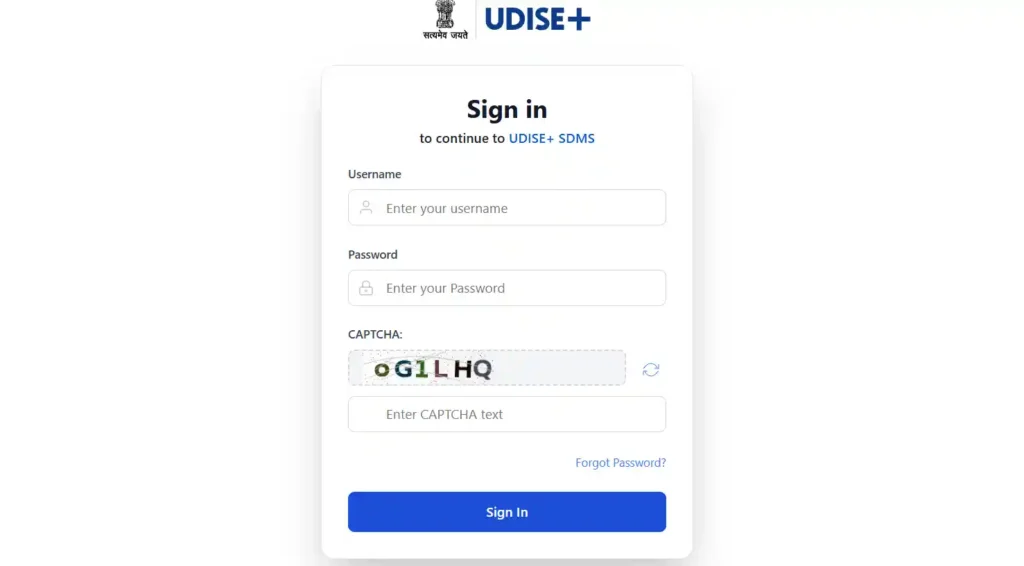
Now enter:
- User ID (provided by your education department)
- Password (created during account setup)
- Captcha code
Important tips:
- Captcha is case-sensitive
- Be careful with O (letter) and 0 (zero)
- If captcha is unclear, click Refresh Captcha
Step 5: Successful UDISE+ Login
After entering correct details, you will be successfully logged in to your UDISE+ dashboard.
You will now see multiple options related to:
- Student forms
- Academic year selection
- Data entry and downloads
- Student profile management
UDISE Plus Teacher Module Login
The UDISE Plus Teacher Module is an official digital platform launched by the Ministry of Education, Government of India under the UDISE+ system. It allows teachers to:
- Manage personal and professional profiles
- Update qualifications, postings, and promotions
- Maintain digital service records
- Request corrections in personal or service details
- Ensure accurate data for national education planning
This system improves transparency, accuracy, and accessibility of teacher data across India.
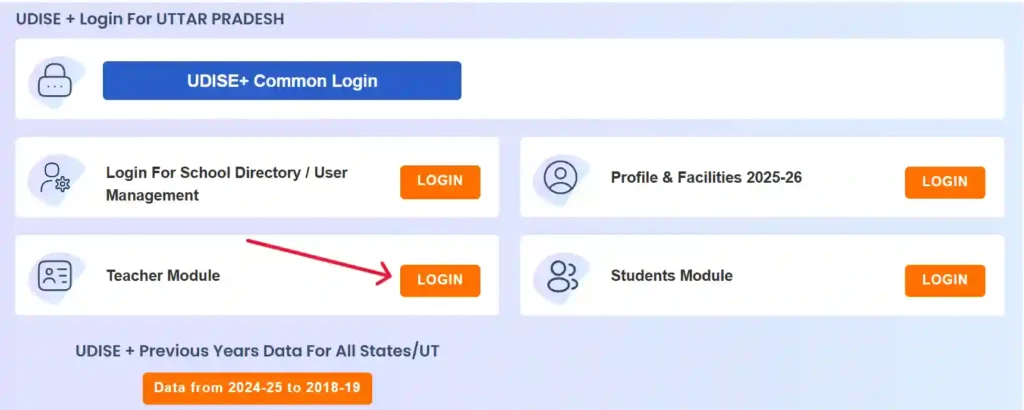
Login to UDISE Plus Teacher Module
Step 1: Open the Official Portal
Go to the UDISE+ Teacher Module login page:
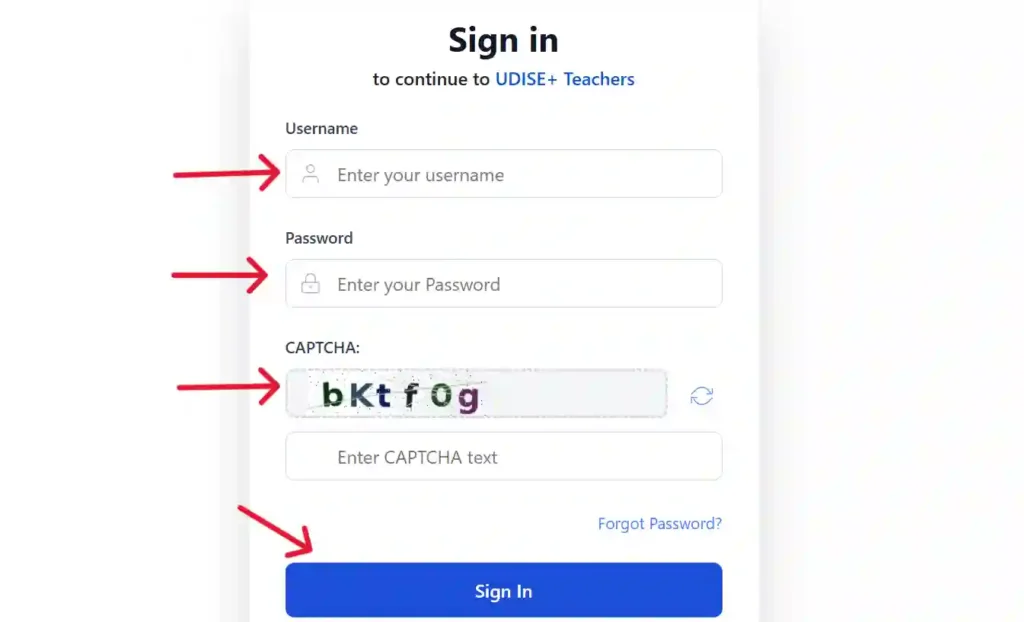
Step 2: Enter Your Username
Enter your Username, This is usually provided by:
- Your school
- Block Education Office
- District MIS Office
Step 3: Enter Your Password
Type your Password, Use the password shared during registration or previous setup
Step 4: Enter Captcha Code
Carefully type the Captcha code shown on the screen, This is required for security verification
Step 5: Click on Login
Click the Login button, You will be redirected to your Teacher Dashboard
What You Can Do After Login
Once logged in, you can:
- View and edit teacher profile
- Update educational qualifications
- Check posting and transfer details
- Verify service history
- Submit correction requests
- Download or review official records
UDISE Plus Student Module Login
The UDISE Plus Student Module is a core part of the Unified District Information System for Education Plus (UDISE+), managed by the Ministry of Education, Government of India. It is used to:
- Maintain student enrollment data
- Generate and manage PEN (Permanent Education Number)
- Track student academic progress
- Handle student transfers between schools
- Ensure accurate reporting for government planning & schemes
This module is used only by authorized schools and education departments.
How to Login to UDISE Plus Student Module
Step 1: Open the Official Website
Go to: https://udiseplus.gov.in
Step 2: Click on “Login for All Modules”
On the homepage, click on the Login for All Modules button.
Step 3: Select Your State
Choose your State from the dropdown list and click Go.
Step 4: Click on Student Module Login
On the module selection page, find and click on: Student Module (Current Academic Year)
Step 5: Enter Login Credentials
Now enter:
- UDISE Code / Username
- Password
- Captcha Code
- Then click on Login.
Step 6: Access Student Dashboard
After successful login, you can:
- Add new students
- Update existing student details
- Manage PEN numbers
- View enrollment records
- Handle transfers & corrections
What Is UDISE+ Profile & Facilities Certification 2025–26?
UDISE+ (Unified District Information System for Education Plus) is India’s official education data platform managed by the Ministry of Education.
For the academic year 2025–26, schools must:
- Verify school profile data
- Update facilities information
- Fix validation errors
- Submit and certify school data officially
Certification ensures your school data is approved, verified, and usable for government planning, grants, and reporting.
How to Login and Start UDISE+ Certification
Step 1: Open Official UDISE+ Portal
Visit: udiseplus.gov.in
Click on Login for All Modules
Select your State, Click Go
Step 2: Login to Profile & Facilities 2025–26
Click on Profile & Facilities 2025–26 And Enter:
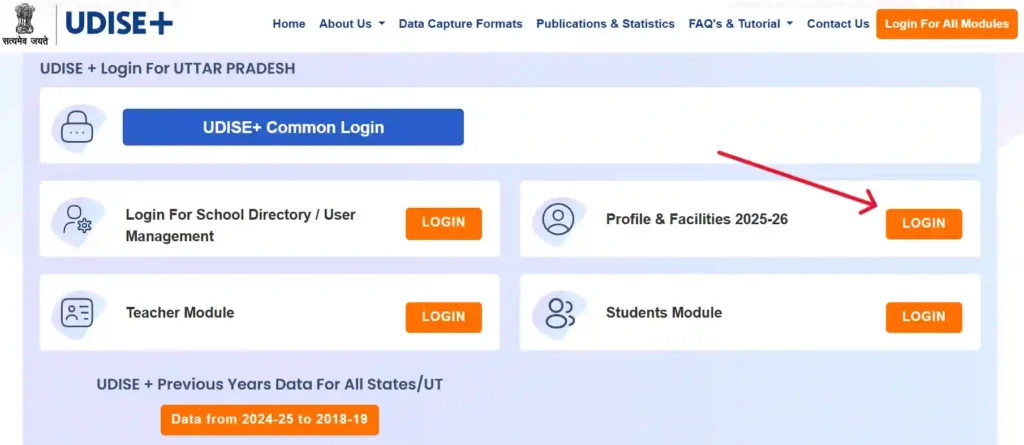
- UDISE Code (as username)
- Password
- Captcha
- Click Login
How to Start School Certification
After login:
- Click on Data Capture, Scroll down
- Click on School Certification (New)
- Add remarks (20–100 characters), such as: > “All school data is completed.”
- Then click Certified and Confirm
Common UDISE+ Certification Errors & Their Meaning
This error means:
• Head of School details missing
• Mobile number/email not updated
• Respondent details incomplete
✔ Can be fixed at School LevelThis error means:
• Recognition status missing
• Curriculum followed not updated
• Recognition year missing
✖ Cannot be fixed at School Level ✔ Must be fixed at Block/District/State LevelHow to Update School Location Details in UDISE+
Note : Only authorized school users can update location details.
Follow these exact steps to update your school’s location information correctly.
Step 1: Login to UDISE Plus
- Visit the official UDISE+ portal
- Choose School Directory Management
- Click On Login for All State/UT, District and Block MIS
- Enter your User ID and Password
- Complete the captcha and login
Step 2: Open User Directory Module
After login:
- Go to the User Directory Module
- Navigate to the Location Details section
- Click on the View button
This will display your current school location information.
Step 3: Click on Edit (If Enabled)
Under School Location Details, click on the: > Edit button
If the Edit button is visible and active, you can proceed with updating your data.
Step 4: Update Required Location Fields
You can now update the following fields as required:
- School Address (complete and correct address)
- Latitude (GPS latitude of school)
- Longitude (GPS longitude of school)
- PIN Code
- Assembly Constituency
- Cluster Resource Centre (CRC)
⚠️ Important Tips:
- Use accurate GPS coordinates
- Double-check spelling of address
- Ensure correct PIN code and CRC selection
- Incorrect data can affect GIS mapping and reports
Step 5: Save Changes
After entering all details:
- Click on the Update button
- Wait for confirmation message
- Your School Location Details will be successfully saved in the UDISE+ system.
Know Your School (KYS) On UDISE+
Know Your School (KYS) is a public feature of UDISE Plus that allows users to access detailed and verified school-level data across India. KYS is part of the Government of India’s initiative to make school education data open and accessible.
Official Know Your School Website
To access Know Your School, open your browser and visit: kys.udiseplus.gov.in
This is the official government portal for searching and viewing school information under UDISE+.
Different Ways to Search Schools on Know Your School
One of the biggest advantages of KYS is its multiple search options, making it easy to find any school in India.
You Can Search a School Using:
- School Name
- State Selection
- UDISE Code
- PIN Code
- Advanced Search (District, Block, Cluster, Category, Management)
This flexibility helps users find schools even if they don’t know the exact name.
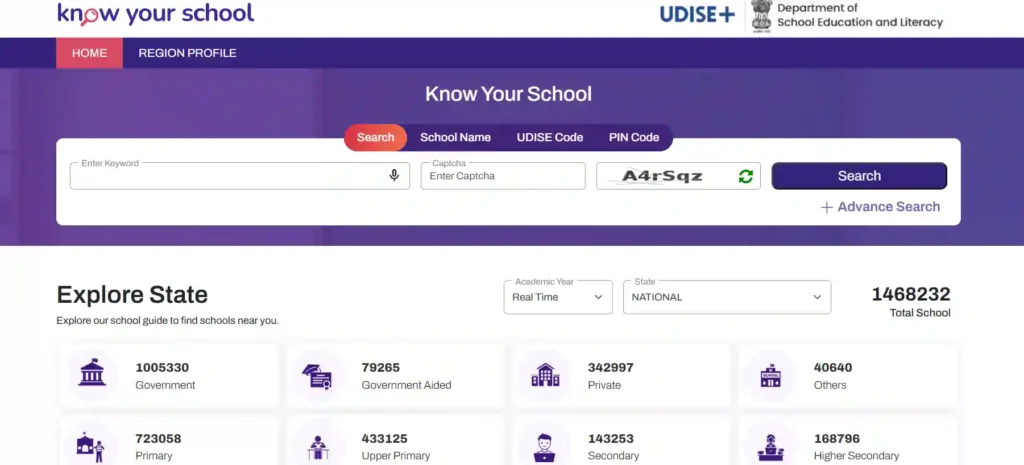
How to Search a School Using PIN Code
Searching by PIN code is one of the easiest methods. Step-by-Step Process:
- Visit kys.udiseplus.gov.in
- Select Search by PIN Code
- Enter your PIN Code
- Enter the Captcha Code
- Click on the Search button
After this, a list of schools in that PIN code area will appear on your screen.
Using Advanced Search for More Accurate Results
If you want more refined results, use Advanced Search. Advanced Search Allows You To Select:
- State (mandatory)
- District (mandatory)
- Block
- Cluster
- School Category
- School Management Type
This is especially useful for:
- Education officers
- School inspections
- District-level analysis
- Researchers and NGOs
FAQs
UDISE Plus is a national education data system by the Government of India used to collect and manage school, teacher, and student information.
Only authorized users such as schools, teachers, MIS operators, block, district, and state education officials can access UDISE Plus.
No, students cannot login directly. Only schools and education department users can access student data.
UDISE Code is a unique 11-digit identification number given to every recognized school in India.
PEN is a unique ID assigned to each student to track their education across schools and states.
It is used to add, update, and manage student enrollment, PEN generation, and academic records.
It is used to manage teacher personal details, service records, qualifications, postings, and promotions.
School Directory contains official school details such as address, contact info, recognition, and management type.
Certification is the process of confirming that school data is complete and accurate for the academic year.
Without certification, school data may not be accepted for government reporting and schemes.
You must fix incomplete sections like contact details, recognition, or additional details before certifying.
Only Block, District, or State MIS officials can update recognition and some additional details.
Use the “Forgot Password” option or contact your Block/District MIS office.
Yes, all recognized government and private schools must update data in UDISE Plus.
Yes, it is used for planning, funding, policy making, and national education statistics.
Contact your Block MIS Officer, District MIS Office, or State Education Department.
Yes, all recognized private schools are required to update UDISE Plus data.
Yes, it is an official government system with secure login and role-based access.